


In part 1 of Shop Wisely, we explored the various work zones found in most public safety answering points. You identified furniture needs in those work zones. And you were given a few tips for expanding the search so you can find the right 911 dispatch positions, desks and tables for your teams.
In this installment, we’ll focus on specific user-identified pain points and furniture solutions that span work zones. We’ll also expand the conversation about features and benefits.
Your PSAP Furniture Should Support a Fluctuating Work Pace
Mission critical environments and their occupants fluctuate between the high-octane work of crisis management to extended periods of watchfulness and waiting. Furniture solutions need to support the mental and physical performance of the dispatcher on duty, while providing robust product longevity in a multi-shift/multi user environment.

This means, the furniture should support healthy ergonomic support, especially during active engagement, and allow active-comfort during watchfulness. This can be accomplished by providing open sightlines, surfaces that allow operators to spread out, and adjustment of height, reach, light and temperature. Ancillary equipment should stow within reach of the operator and not impede active work-tool access. And for teams that require steadily-manned positions, there should be dedicated space for personal items and a beverage or snack.
Support and admin furniture should offer height adjustability where possible. Mobile desks and meeting tables can support rapid reconfiguration for training, drills and active emergency response.
For older facilities or re-purposed shell buildings, the constraints on flexibility and footprint are tighter. Furniture solutions that effectively flex across these areas will enable architects and planners to imagine decades of useful applications.
What do your call-takers, dispatchers, and technicians need?
In mission critical operations, three primary user groups interact with the furniture regularly and/or have a stake in the ground when it comes to facility needs and ROI – operators, IT teams, and facility managers. Most PSAP teams report similar pain points and desire similar amenities in their dispatch console solutions. However, teams within the PSAP are often looking for different features. Here are the TOP 10 features PSAP teams desire. Which of these are most important to your teams?
Users (Dispatcher, Call taker, Operator/Monitor) | Operations (Facility Manager) | Technology (IT Manager) |
 | Should require 50% less installation time than past builds. | Easy to access technology, cables, CPU’s etc. |
Environment controls – heating, cooling, light. | Furniture should scale and reconfigure for the lifetime of the center. | “Plug and Play” options. |
I want plenty of work space. I don’t want to feel cramped. |  | We need space for screens, PCs, input devices and blade technology. |
Help reduce sound amplification so I can concentrate on my call. | Integrate power rather than using power strips/surge suppressors. | Single surface would minimize cabling interference. |
I need visual communication with managers and sometimes benefit from separation. | Simple to understand and simple to specify configurations. |  |
A place for my stuff and integration of work tools. | Low-volt, low draw appliances. | Be able to house 6+ standard size PCs . |
A place for my…  | Durable – lasts at least 10 years; more like 15. | Locations for 19″ racks and UPS blocks. |
Integration of lighting – direct and indirect. Casting a light on keyboards is needed. | Rugged and easy to maintain/clean. | Capacity for patch panels, USB devices, CAT5, telephones; consider DVI. |
Prefer large surfaces for multiple input devices and to spread out. | Should look nice; a “professional look” helps the team and our reputation. | Stations should offer extra space for future technology additions. |
Our area should look good and feel good to be in. |  | Accommodate R56 grounding standards. |
Trying to accommodate all of these needs can be overwhelming. You will find, however, that reputable manufacturers have “designed-in” solution sets that meet these needs. And they have teams in place to simplify the buying process – from specification to installation.
Value of a consolidated furniture purchase
Feedback from teams like yours indicate that since the furniture procurement lead is not an expert in commercial furniture acquisition, the buying process is any number of these: scary, challenging (in a good way), not enjoyable, confusing, stressful. More so, in addition to the initial buy, someone on the team will be responsible for an enduring relationship with multiple product providers.

Choosing the best console and furniture provider: Beyond the feature set
When you consider the many elements that require regular maintenance or service administration associated with long-term ownership can be complex – dispatch consoles, CAD systems, radio systems, office furniture, chairs, lighting.
Successful customer-product manufacturer relationships ease the team-identified pain points discussed previously and those expressed by procurement representatives. The solutions typically roll-up into these categories:
- Design
- Ease of Purchase + Purchase Price Leverage
- Service Continuity
What makes technology furniture unique?
Before we dissect the value-add of the above three solution sets, let’s review the basic, functional must-haves for technology and commercial furniture.
Technology Furniture | Commercial Desks, Tables, Storage |
|
|
As you can see, the first two functional feature sets are common to both types of furniture. However, it is important to note that the durability standard is higher for 24/7 manned positions and height adjustability is often an optional feature for support areas.
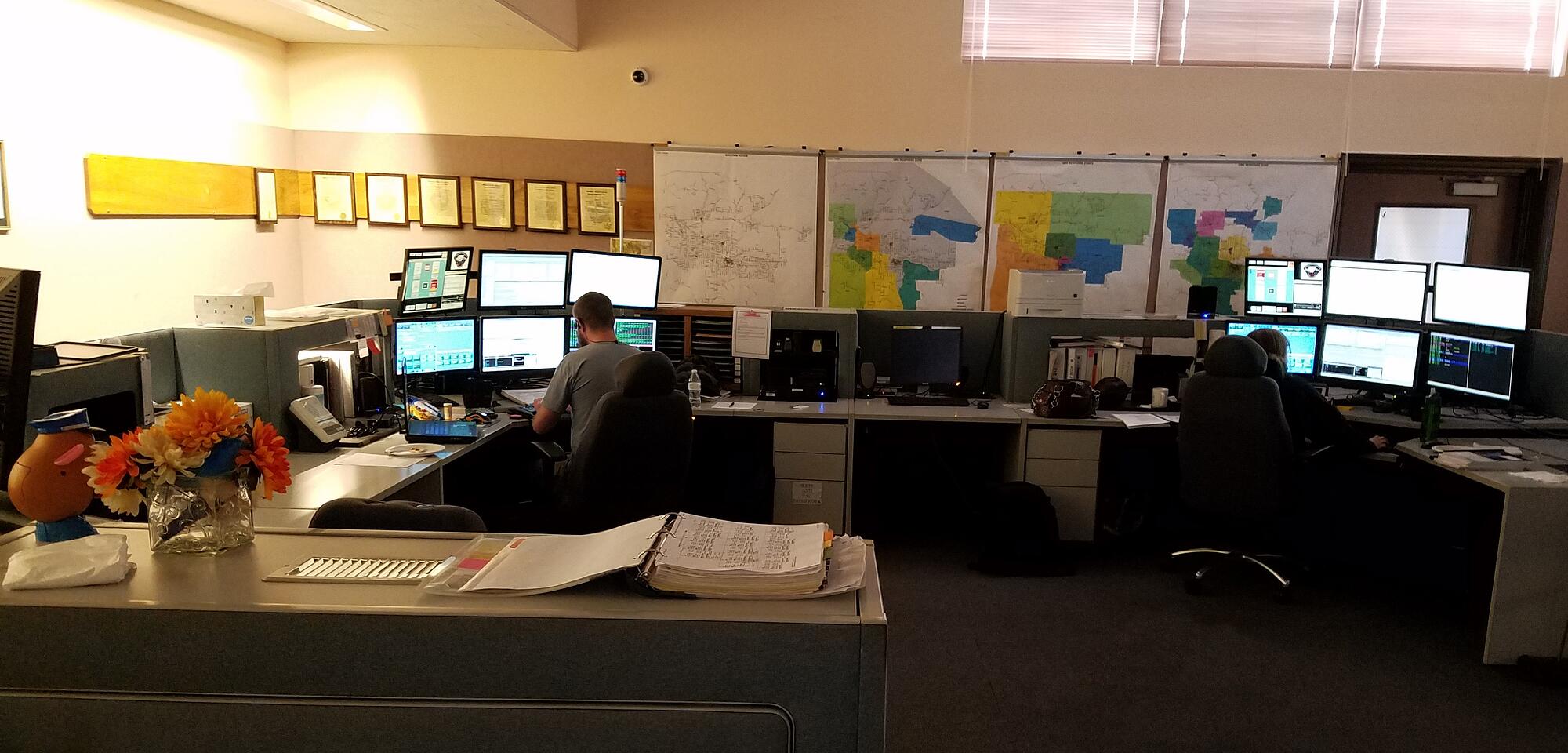
The PSAP shown above is using technology furniture they purchased in 1995. That’s 22 years! Although they would have benefited from a future proof design, their consoles have held up beautifully. The combination of metal and wood construction has performed as it was designed – structurally durable with soft touch details that are comfortable, professional and welcoming. When you make an informed console and commercial furniture purchase, you can have it all.

Next steps for choosing the best products for your team
You are diving deeper in order to make the very best purchasing decision you can. If you are following this series, you have now assessed your facility. You know what work zones need dispatch consoles, monitoring desks, storage and tables. You’ve asked your colleagues for their top three needs as they relate to furniture they use everyday. And, you’ve toured the websites of at least three technology furniture providers and three commercial furniture providers to familiarize yourself with what’s out there.
Now, you are ready for the next stage: get specific feedback from providers. This will help you formulate a budget, and determine if you have wiggle-room to up your features requests.
- Using the Top 10 console features (above) as a guide, provide multiple manufactures with a “need” and “want” list.
- Ask them to provide at least two options for each technology and each commercial furniture unit you plan to buy.
From this, you can narrow providers by cost, features, design and long-term service reputation. Do remember that, as with most large purchases, you get what you pay for. It is tempting to go for the low cost dispatch console only to discover that the furniture does not perform as expected in a demanding 24/7 environment. If you want to increase the return on your investment, be sure you fully evaluate the manufacturer and the product – durability, user feature sets, and potential for handling changing technology.
Part 3
Next week, we’ll synthesize the buying journey. We’ll also spotlight the extended value of buying from a full-facility provider: design continuity, ease of purchase, and service continuity.